Hello! Today we’re going to talk a little about two very simple functions within the Python language; print and string.
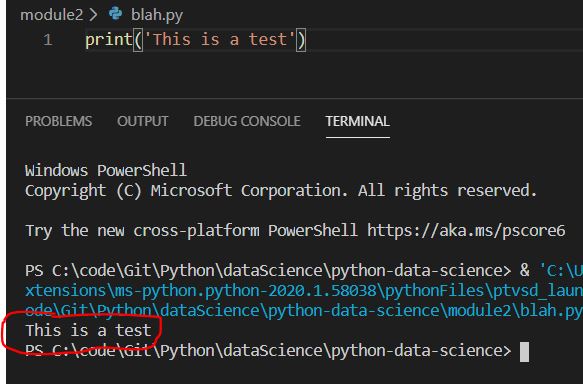
Starting with the print function. In the simplest form the print function allows a developer to output values to the console terminal of the running system. For example, if I were running a simple blah.py script in my local IDE (I happen to use Visual Studio), I could pull up the terminal and have the values output there. Let’s say I have the follow bit on code:
print(‘This is a test’)
The terminal console would output that exact message within the single quotation marks ‘This is a test’, as shown below:
Moving on the the string function. The string function actually is a built in module with various classes, constants, and functions available for use within your programs/scripts. A few examples utilizing various extension functions of the string module include:
- upper – Converting all characters within a string to uppercase
- lower – Converting all characters within a string to lowercase
- title – Converting all first characters within a word to uppercase
For a much more extensive list of available classes, constants, and functions provided by the string module by Python see: https://docs.python.org/2/library/strings.html
Below is a simple example Python script that utilizes both of the aforementioned functions. In the example we can see we’re importing the string module from the Python library and assign an in-memory string variable (aka buffer variable or a runtime variable) a set of static text. We then print this text as it was originally set. Then we utilize various extension functions from the string module to manipulate the original static text into various other forms; uppercase, lowercase, and titled cased.

For a copy of this particular example feel free to see my GitHub repo: https://github.com/joshsnyder/python-data-science/blob/master/module2/printString.py
 Josh's Data Science Blog